
If you’re like me, you’ve probably run into problems with your TV signal, internet, or even your home security cameras. Sometimes, the issue is not your device, but the long, thin wire connecting it all: the coaxial cable. I learned this the hard way after a week of fuzzy TV and random internet drops. Testing coax cable might sound technical, but trust me, you can do it yourself. Let me walk you through what I did, what I learned, and how you can make sure your coax cables are working right.
Why Testing Coax Cable Matters
When my TV started glitching, I first thought the problem was with my service provider. But after some calls and a bit of online searching, I realized the coax cable might be the culprit. I found out that even a tiny break, loose connector, or hidden damage inside the cable can mess up your signal. If you skip testing, you might waste money on new devices, or pay for a technician visit you don’t really need.
Coax cables are everywhere—TV, internet, security systems, and sometimes even radio. Over time, they can get pinched, chewed by pets, or just wear out. Testing them is the only way to know for sure if they’re still good.
What You Need To Test Coax Cable
When I started, I had almost nothing. But I quickly found out you only need a few tools. Here’s what I used:
- Coax cable tester (also called a continuity tester)
- Multimeter (for a deeper check)
- Flashlight (to see small details)
- Replacement connectors (just in case)
- Screwdriver and pliers
You don’t have to buy fancy gear. Even the simple testers work well. But if you want, you can find testers for around $10-30 online or in hardware stores.

Step-by-step: How I Tested My Coax Cable
Let me guide you through how I actually did it, step by step.
1. Inspect The Cable Visually
First, I unplugged both ends of the cable. I looked for obvious problems like:
- Cracks or cuts in the outer layer
- Bent or broken connectors
- Signs of rust or dirt
- Sharp bends or kinks
Once, I found my cat had chewed a cable behind the sofa. The damage was clear. But sometimes you won’t see any problem from outside.
2. Use A Coax Cable Tester
I bought a coax cable tester online. It came with two parts: a main unit and a remote. I plugged one end of the cable into the tester, and the other end into the remote. Then, I pressed the button. If the light turned green, the cable was good. If it stayed off or turned red, there was a problem.
What I like about these testers is that they’re quick and don’t need much setup. You don’t need to know much about electricity either.
3. Try A Multimeter For Deeper Testing
If you want to dig deeper (and I did, because I’m curious), you can use a multimeter. Here’s how I did it:
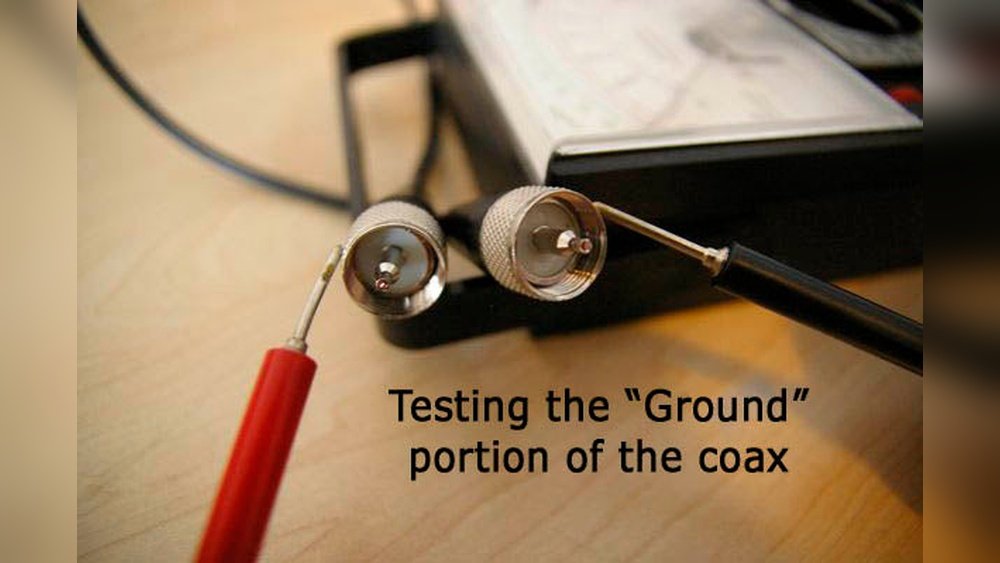
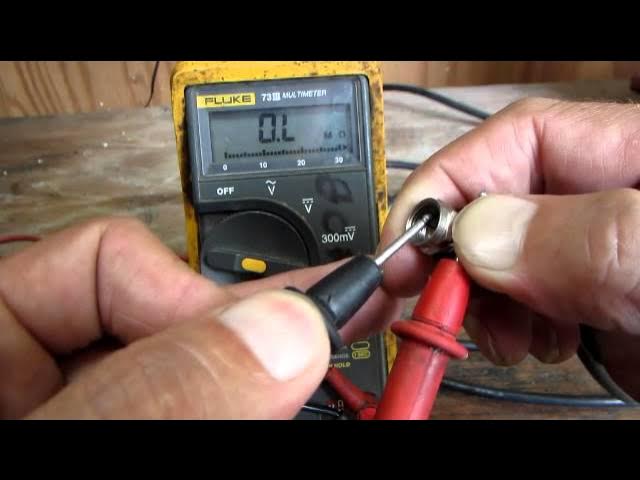
- Set the multimeter to the “continuity” or lowest “ohms” setting.
- Touch one probe to the center pin of one end of the cable.
- Touch the other probe to the center pin at the other end.
- If the meter beeps or shows a number close to zero, the center wire is good.
- Now, do the same with the outer metal part (the shield). It should also beep or show low resistance.
To check for a short, touch one probe to the center pin and one to the outer shield. If it beeps, you have a short circuit inside the cable. That means the cable is bad.
4. Swap Out The Connectors
Sometimes the cable is fine, but the connector is loose or dirty. I’ve seen this happen a lot, especially with older cables. If you notice rust or wobbly connectors, you can cut off the old end and add a new connector.
These are cheap and easy to install with just a small tool.
5. Test The Signal (optional)
If you’re still not sure, you can plug the cable back in and try your device. For TVs, I scanned for channels. For the internet, I checked my speed. Sometimes a cable “works” but gives a weak signal. If you see a drop in quality, the cable might still have hidden damage.
Types Of Coax Cable And How They Differ
Not all coax cables are the same. I learned this after buying the wrong type and getting bad internet speeds. The main types you’ll see are:
- RG6: Most common for home TV and internet
- RG59: Used for short runs, old TV setups, or security cameras
- RG11: Thicker, used for long distances
Here’s a quick comparison I made for myself:
| Type | Diameter | Main Use | Max Distance (ft) |
|---|---|---|---|
| RG6 | 0.27 in | TV, Internet | Up to 200 ft |
| RG59 | 0.24 in | CCTV, Short runs | Up to 100 ft |
| RG11 | 0.41 in | Long distance | Up to 400 ft |
If you use the wrong type, you might get weak signals or interference. Always match the cable to your setup.
Common Problems I’ve Found (and How I Fixed Them)
After testing many cables at home and for friends, these are the most common problems I’ve seen:
- Loose connectors: Just tightening them can fix the problem.
- Bent pins: Straighten them gently with pliers.
- Corrosion: Replace the connector or cut off the bad part.
- Crushed cable: If someone steps on or pinches the cable, replace it.
- Hidden shorts: Sometimes, the wires inside touch each other. You’ll need to replace the cable.
- Wrong type of cable: Switching to RG6 fixed my blurry TV.
- Splitter issues: Sometimes the problem isn’t the cable, but a bad splitter.
I once spent hours testing cables, only to find that a cheap splitter was to blame. Always check every part of the connection.
How To Choose The Right Coax Cable Tester
When I was shopping for a tester, I saw many options. Here’s what I learned matters most:
- Easy-to-read display: Lights or simple screens are best.
- Works with different cable types: Some testers only work with RG6, others with all types.
- Durable build: Cheap testers can break fast.
- Extra features: Some have tone generators to help you trace cables in walls.
Here’s a table comparing features I noticed:
| Tester | Display | Cable Types | Extra Features | Price Range |
|---|---|---|---|---|
| Basic Tester | LED Lights | RG6, RG59 | None | $10-$15 |
| Advanced Tester | LCD Screen | RG6, RG59, RG11 | Tone Generator | $25-$40 |
| Pro Tester | LCD + Sound | All Types | Tracing, Mapping | $40+ |
I started with a basic tester, and it was enough for most jobs. But if you have a lot of cables, the extra features can save time.
Mistakes I Made (so You Don’t Have To)
I wish someone had warned me about these before I started:
- Testing without disconnecting devices: Always unplug everything first, to avoid damaging your gear.
- Not labeling cables: If you have many cables, mark them before unplugging. I once lost track and had to start over.
- Rushing the test: Take your time. A quick test can miss problems.
- Skipping the visual check: Sometimes, you can see the problem without any tester.
- Forgetting about splitters and wall plates: These can be the weak link.
A big insight: sometimes, the cable works, but the signal is weak due to old splitters or bad wall plates. Always test the whole path.
How Often Should You Test Coax Cables?
I used to think you only needed to test when something was broken. But after replacing a few bad cables, I now check my main lines every year. If you move furniture or do renovations, check again. For outdoor cables, check after storms or heavy rain.
What To Do If The Cable Fails The Test
If your cable fails, here’s what I suggest:
- Try replacing the connectors first, especially if the cable itself looks okay.
- Replace the whole cable if there’s a short, cut, or heavy damage.
- Check connected devices to make sure they’re not the problem.
- Try another cable to confirm the issue.
- Call a professional only if you’ve tried everything and still have issues.
You can find more about coaxial cables and their uses on the Wikipedia page for coaxial cable.
Two Non-obvious Insights I Wish I Knew Earlier
Let me share two things I didn’t know at first:
- Even tiny bends or kinks inside walls can ruin a signal. I once fixed a bad internet line by re-routing a cable so it didn’t bend sharply behind a cabinet.
- Old paint or wall dust inside connectors can cause problems. Clean the ends before testing or reconnecting. I fixed a “broken” cable just by wiping dust off the connector.

Frequently Asked Questions
How Do I Know If My Coax Cable Is Bad?
Look for signs like no signal, fuzzy TV, or slow internet. Test the cable with a tester or multimeter. If it fails, replace or repair it.
Can I Use Any Coax Cable For Internet?
Not always. Use RG6 or better for internet. RG59 might not carry high-speed data well, especially for long distances.
Is It Safe To Test Coax Cable Myself?
Yes, it’s safe if you unplug all devices first. Never test a live cable. Most tests use low voltage or none at all.
What If My Tester Says The Cable Is Fine, But My Tv Still Doesn’t Work?
Check for bad splitters, wall plates, or devices. Sometimes the problem isn’t the cable, but another part of the system.
How Long Do Coax Cables Last?
Good quality coax cables can last 10-20 years indoors. Outdoor cables may wear out faster due to sun, rain, or animals.
Testing coax cable isn’t hard once you know what to do. With just a few tools and some patience, you can save yourself time and money. I hope sharing my experience helps you get the clear signal you need. If you run into trouble, remember: check every part of the system, and don’t be afraid to get your hands a little dirty!
As an Amazon Associate, We earn from qualifying purchases