
Testing LAN cables might sound like a task for tech pros, but honestly, it’s much easier than you think. I remember the first time I had to check a LAN cable at home. My internet was acting up, and I was sure the problem was with my router or my computer.
But after a few frustrating hours, I realized the issue was my network cable. That day taught me a lot about troubleshooting and, more importantly, about the value of knowing how to test LAN cables yourself. I want to share my experience, tips, and some small details that most people miss.
By the end of this, you’ll be able to test LAN cables with confidence, just like I do now.
What Is A Lan Cable And Why Test It?
A LAN cable, also known as an Ethernet cable, connects devices to a network for data transfer. It’s the cable that links your computer to your router, your game console to your modem, or your TV to the internet. These cables are everywhere in homes, offices, and data centers.
Why test them? Over the years, I’ve learned that even a small problem in a cable can slow down or kill your internet connection. Sometimes, the issue is not visible. The cable might look perfect on the outside, but inside, a wire can be broken, or the connectors can be loose.
Testing helps you catch these problems early. I’ve saved money and time by checking cables myself before buying new ones or calling for help.
Common Reasons Lan Cables Fail
Based on my experience, there are several reasons a LAN cable might stop working or perform poorly:
- Physical damage: Pets chewing on cables, chairs rolling over them, or cables getting pinched behind furniture.
- Connector problems: The plastic clip breaks, or the metal pins inside the connector bend.
- Poor-quality cables: Cheap cables often fail faster, especially if bent or stretched.
- Interference: Nearby electrical wires can mess with signals, especially if the LAN cable isn’t shielded.
- Age: Like everything, cables wear out. An old cable may not support fast speeds anymore.
Knowing these issues helps you spot trouble faster when testing.

Tools You Need To Test Lan Cables
You don’t need a toolbox full of expensive gadgets. I’ve tested dozens of cables with just a few simple tools:
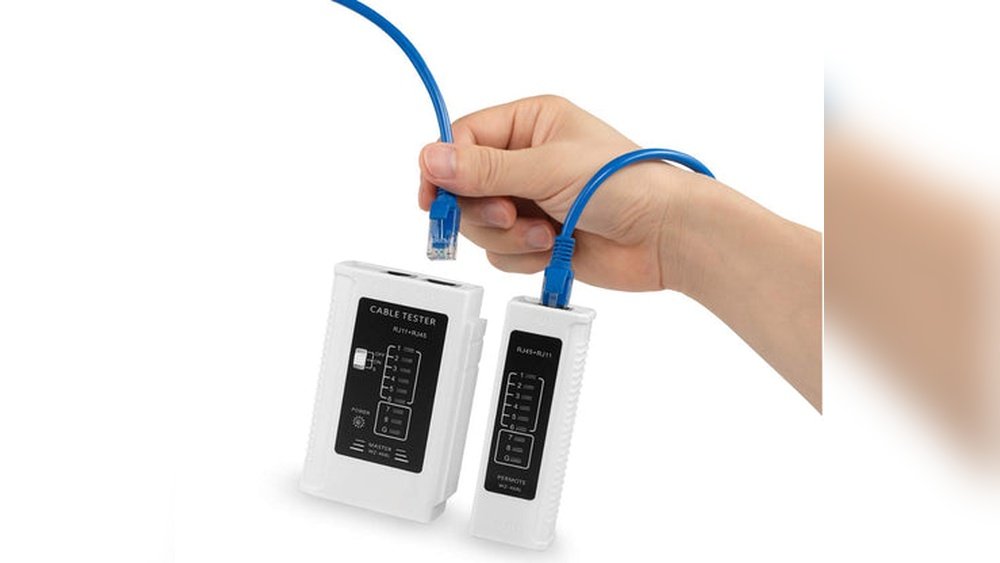
- LAN cable tester: This device checks if each wire inside the cable is working.
- A working device and port: Sometimes, just swapping cables between devices can help you spot a bad cable.
- A multimeter: For advanced testing, but I rarely use it unless I suspect serious damage.
- A smartphone or laptop: Useful for testing internet speed or checking connections.
When I started, I bought a basic LAN tester online for less than $15. It’s paid for itself many times.
Types Of Lan Cable Testers
Over time, I’ve used different testers. Some are simple, others are more advanced. Here’s a quick comparison that helped me choose the right one:
| Tester Type | Features | Price Range | Best For |
|---|---|---|---|
| Basic LED Tester | Checks wire continuity | $10 – $20 | Home users |
| Advanced Signal Tester | Checks speed, wire map, and faults | $50 – $100+ | IT pros, offices |
| Multimeter | Manual continuity test | $15 – $50 | DIY users |
My advice? Start with a simple LED tester unless you need to check a lot of cables or troubleshoot in a business setting.

Step-by-step: How I Test Lan Cables
Let’s get practical. Here’s how I test LAN cables at home and in the office.
1. Visual Inspection
Before I plug anything in, I look at the cable closely. I check for:
- Cracks or cuts in the plastic
- Bent or broken connectors
- Missing or bent metal pins inside the plug
- Dirt or dust inside the connector
Sometimes, I find the problem right away. Once, my cat chewed a cable, and I saw teeth marks and broken wires. No need for fancy tools!
2. Using A Lan Cable Tester
This is my favorite method. It’s quick, reliable, and doesn’t need a computer.
How I do it:
- Plug one end of the cable into the “Main” side of the tester.
- Plug the other end into the “Remote” side.
- Turn on the tester. Most testers have lights labeled 1 to 8 (or more).
- Watch as the lights blink in order.
If all lights blink in order, the cable is good. If a light skips, stays off, or lights up out of order, there’s a wiring problem.
I once found a cable where only 6 out of 8 lights came on. That meant two internal wires were broken—no wonder my speeds were slow.
3. Swapping Cables
When I’m in a hurry, I use the “swap test. ” I unplug the suspect cable and use a known good cable instead. If my connection works, the old cable was bad.
This method is not perfect, but it works if you don’t have a tester handy.
4. Testing With A Multimeter (advanced)
I only use a multimeter for stubborn problems. Here’s what I do:
- Set the multimeter to “continuity” mode.
- Touch one probe to a pin on one connector.
- Touch the other probe to the same pin on the other connector.
If I hear a beep, that wire is good. If not, the wire is broken inside.
This takes time, but it’s a lifesaver for custom cables or when I suspect hidden damage.
5. Speed Test On Devices
Sometimes, a cable works but is slow. I use an online speed test site on my computer. If my speeds are much lower than what I pay for, I try a new cable. Once, a cable limited my gigabit internet to just 100 Mbps.
Replacing it fixed everything.
Reading The Results: What To Do Next
Once I finish testing, I use these results to decide my next steps:
- All tests good: The cable is fine. I check my devices or network settings instead.
- One or more wires fail: I replace the cable. Repairing is rarely worth it unless I made the cable myself.
- Physical damage: I throw the cable away. Damaged cables are unreliable and can cause more trouble later.
Don’t make the mistake I did early on—trying to tape or “fix” a broken LAN cable. It never lasts. A new cable is much safer and often cheap.
Different Lan Cable Categories And Their Importance
Not all LAN cables are the same. Over the years, I’ve learned that the type of cable matters a lot, especially for speed and reliability. Here’s a simple table I made for myself:
| Category | Max Speed | Max Distance | Best Use |
|---|---|---|---|
| Cat5e | 1 Gbps | 100 meters | Home, small office |
| Cat6 | 10 Gbps | 55 meters | High-speed home, gaming |
| Cat6a | 10 Gbps | 100 meters | Offices, large homes |
| Cat7 | 10+ Gbps | 100 meters | Data centers, future-proofing |
I once used an old Cat5e cable for my new gaming PC and wondered why I couldn’t get full speed. Switching to Cat6 made a huge difference.
Common Mistakes When Testing Lan Cables
I’ve made plenty of mistakes when learning how to test cables. These are the most common ones I see—and how you can avoid them:
- Testing only one end: Always check both ends. Sometimes the connector on one side is loose or dirty.
- Ignoring speed: A cable can pass continuity but still be too slow for your needs.
- Not labeling cables: In offices, I used to mix up good and bad cables. Now, I use tape or markers to label them after testing.
- Testing with devices that have their own issues: If your computer’s network card is bad, it can look like a cable problem. Try another device if you’re unsure.

Tips For Keeping Lan Cables In Good Shape
From years of dealing with network messes, here’s what keeps my cables working longer:
- Don’t bend cables sharply. Gentle curves are best.
- Avoid running cables under heavy furniture or doors.
- Use cable clips or ties to keep them neat and safe.
- Replace old cables every few years, especially if you upgrade your internet speed.
- Keep pets away from cables—learned this the hard way!
When To Replace, Repair, Or Upgrade
Deciding what to do with a cable after testing is important. Here’s my personal advice:
- Replace if there’s visible damage, broken wires, or slow speeds even after testing.
- Repair only if you made custom cables and have the right tools (crimper, connectors). For most people, it’s easier to buy a new one.
- Upgrade if your cable is old (Cat5 or lower) and you have high-speed internet. Newer cables handle speed and interference better.
I usually buy a few spare cables and keep them handy. It saves time during emergencies.
The Value Of Regular Testing
Many people only test cables when there’s a problem. From my experience, testing once a year, or anytime you move things around, helps a lot. It prevents surprise outages and keeps your network running smoothly.
Regular testing also helps in offices where many cables connect different rooms. I once found three “problem” cables during a yearly check, even though no one had complained yet.
Where To Learn More
If you’re interested in learning deeper details about LAN cables, standards, and troubleshooting, I recommend reading this Wikipedia article on Ethernet cables. It covers technical topics in simple language.
Frequently Asked Questions
What’s The Easiest Way To Test A Lan Cable At Home?
Use a simple LAN cable tester. Plug both ends of the cable into the tester and check the lights. If all lights blink in order, your cable is good. Swapping with a known good cable also works in a pinch.
Can A Lan Cable Work But Still Be “bad”?
Yes. Sometimes, a cable passes basic tests but slows down your connection. This usually happens with old or low-quality cables. Always check your internet speed with a speed test if you suspect problems.
How Do I Know If My Lan Cable Supports Gigabit Speeds?
Check the category written on the cable (like Cat5e, Cat6). Cat5e and higher usually support gigabit. If it’s older (just Cat5), it may not handle high speeds. Testing with a speed test and a modern device helps confirm this.
Is It Safe To Repair A Broken Lan Cable?
It’s possible but not always practical. If you have a crimper and connectors, you can cut and re-terminate the cable. For most people, it’s easier and safer to buy a new cable.
Do Lan Cables Wear Out Over Time?
Yes. Like all electronics, LAN cables can wear out from bending, stepping on them, or just aging. If you upgrade your internet or devices, it’s smart to check and possibly replace old cables.
Testing LAN cables isn’t as hard as it seems. My own experience has saved me from many headaches, slow connections, and unnecessary tech calls. I hope my story helps you keep your network fast and reliable—without any stress.
As an Amazon Associate, We earn from qualifying purchases