
I remember the first time I wanted to clean my PS5 fan. My console was getting loud, and dust was probably the reason. But when I looked online for guides, I found so many screwdriver types, brands, and warnings. It was confusing.
I’m writing this because I’ve gone through the process myself. If you want to open your PS5 fan and you’re not sure which screwdriver to use, I’ll walk you through everything. I’ll share what worked, what didn’t, and the small details I wish I knew before I started.
Why You Need The Right Screwdriver For Ps5 Fan
At first, I thought any small screwdriver would do. I tried using one I found in an old eyeglass repair kit. It didn’t fit, and I almost stripped the screw. The PS5 fan is held by screws that need a specific bit. If you use the wrong tool, you risk damaging your console. Replacement screws are hard to find, and a stripped screw makes everything harder. Also, Sony uses different screws for different parts, so you need to know exactly which one for the fan.
The 5 Essential Screwdrivers For Opening The Ps5 Fan
After opening my PS5 several times for cleaning and upgrades, I learned that you need five main screwdrivers or bits for the job. Here’s what you really need:
1. Phillips 1 Screwdriver
This is the main tool you’ll use. Most PS5 internal screws, especially for the fan, are Phillips head. I used a Phillips #1, and it fit perfectly. The tip is just the right size—not too small, not too big. A #0 might work, but it can slip and damage the screw. I found that a magnetic tip helps a lot. Screws inside the PS5 are tiny and easy to drop.
2. Phillips 0 Screwdriver
Some smaller screws inside the PS5 need a Phillips #0. I realized this when I was trying to open the SSD cover and another small bracket near the fan. The #0 fits these little screws snugly. If you only have a #1, you might get by, but it’s riskier. Using the right size gives you more control and prevents stripping.
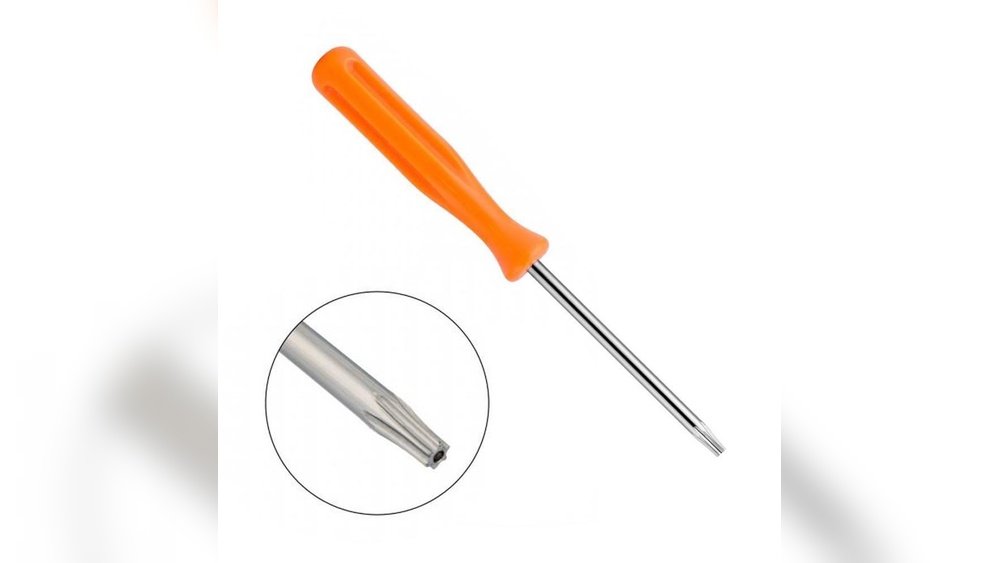
3. T8 Torx Security Screwdriver
This one surprised me. Sony uses Torx security screws in a few places, including some models and regional versions. The T8 Torx has a star shape with a hole in the center (sometimes called T8H). I didn’t have one at first, so I tried a regular Torx. It didn’t work because of the security pin in the middle. If your PS5 has these screws, you’ll need a T8 Torx security bit.
4. Plastic Pry Tool
Okay, not a screwdriver, but just as important. When I first opened my PS5, I used a butter knife instead of a plastic pry tool. Bad idea. I scratched the white covers, and they wouldn’t snap back tightly. A plastic pry tool makes it easy to lift the PS5’s side panels without damage. They’re cheap and come in most electronics toolkits.
5. Precision Tweezers
You might be thinking, “Tweezers aren’t a screwdriver!” But trust me, they’re a lifesaver. When you remove the fan screws, they sometimes fall into hard-to-reach spots. Precision tweezers let you pick them up without shaking or tilting the whole console. I always keep them handy.

Why Each Tool Matters
Let me break down why each one is important, based on what I experienced:
- Phillips #1 – The main screws for the fan use this size. Without it, you can’t get the fan out.
- Phillips #0 – For smaller brackets and covers. Using the wrong size can strip the head.
- T8 Torx Security – Needed for some PS5 models and regional screws. Check your fan area before starting.
- Plastic Pry Tool – Prevents scratches and broken clips when opening the PS5.
- Precision Tweezers – Makes screw handling much easier, especially in tight spots.
If you’re missing even one, you might get stuck halfway and have to reassemble. That happened to me the first time, and it was frustrating.
A Quick Comparison Of Screwdriver Types
I made a simple table to compare the features of each screwdriver I used:
| Screwdriver Type | Main Use | Fit for PS5 Fan? | Difficulty Level |
|---|---|---|---|
| Phillips #1 | Fan screws | Perfect fit | Easy |
| Phillips #0 | Small brackets | Good fit | Moderate |
| T8 Torx Security | Security screws | Needed for some models | Moderate |
| Plastic Pry Tool | Opening covers | Not for screws, but essential | Very easy |
| Precision Tweezers | Handling screws | Accessory | Easy |

Step-by-step: How I Opened My Ps5 Fan
- Unplug everything. I turned off my PS5, unplugged all cables, and waited a few minutes.
- Remove the side panels. I used the plastic pry tool to gently lift the panels. No force needed.
- Locate the fan screws. I found the fan under the big silver shield. The screws were easy to spot.
- Use Phillips #1. I used the #1 screwdriver to remove the fan screws. They came out smoothly.
- Check for Torx screws. In my PS5, there were no Torx screws on the fan itself, but I checked just in case.
- Lift the fan out. I used tweezers to grab any screws that dropped or were stuck.
- Clean and reassemble. After cleaning, I put everything back the same way.
It took me about 20 minutes the first time. Now, with the right tools, I can do it in 10.
How To Choose A Good Screwdriver Set
When I first started, I bought a cheap set online. It worked, but the tips wore down quickly. After a while, I learned that a good screwdriver set makes a big difference. Here’s what matters most:
- Strong, magnetic tips – Makes it easier to pick up small screws.
- Comfortable grip – Your hands won’t slip.
- Multiple sizes – For different PS5 parts.
- Includes Torx security bits – Not all sets do.
- Comes with pry tools and tweezers – Saves you from buying extra tools.
A quality set costs a little more, but it lasts longer and prevents mistakes. I use mine for other electronics, too. For examples and recommendations, you can check sets reviewed by tech experts on iFixit.
Mistakes I Made And Lessons Learned
I want to share a few mistakes, so you can avoid them:
- Using the wrong size screwdriver. I stripped a screw head because I thought “close enough” was fine. It wasn’t.
- No magnetic tip. I dropped a screw inside the console. It took 15 minutes to shake it out.
- Forcing the side panels. I broke a clip my first time. Always use a plastic tool.
- Skipping the Torx bit. I assumed all screws were Phillips. Some are not, especially in newer models.
Take your time, check each screw before turning, and lay out your tools before you start. It saves so much stress.
A Deeper Look: Why The Ps5 Fan Needs Cleaning
You might wonder if it’s worth opening your PS5 at all. From my experience, dust builds up after a few months. The fan gets loud. Heat increases, and sometimes games stutter or crash. After cleaning my fan, the difference was clear: my PS5 ran quieter, cooler, and games loaded faster. Some people say cleaning isn’t needed, but for me, it’s an easy way to protect a $500 console.
Comparing Cheap Vs. Quality Screwdrivers
Here’s another table showing what happened when I used cheap vs. high-quality screwdrivers:
| Feature | Cheap Screwdriver | Quality Screwdriver |
|---|---|---|
| Tip durability | Wears out fast | Lasts for years |
| Fit | Loose or wobbly | Perfect fit |
| Comfort | Slippery | Comfortable grip |
| Extras included | Few or none | Pry tools, tweezers, case |
| Risk of stripping screws | High | Low |
Two Insights Most Beginners Miss
- You don’t need to remove every screw. The first time, I took out screws that had nothing to do with the fan. I wasted time. Learn which screws matter for the fan, and leave the rest.
- Static electricity is a real risk. I once shocked my PS5 motherboard because I didn’t ground myself. Now, I always touch a metal part of my desk before opening the console. It’s simple but important.
How Often Should You Clean The Ps5 Fan?
In my experience, cleaning every six months is enough if your room is not too dusty. If you have pets or smoke, every three months is better. I set a reminder on my phone so I don’t forget. It’s easier to prevent dust than fix overheating problems later.
Frequently Asked Questions
What Screwdriver Do I Need To Open The Ps5 Fan?
You need a Phillips #1 screwdriver for the main fan screws. You might also need a Phillips #0 for small brackets and a T8 Torx security bit if your PS5 uses security screws. Always use a plastic pry tool for the covers.
Can I Use A Regular Phillips Screwdriver From My Toolbox?
Sometimes, but it’s not ideal. Most toolboxes have bigger Phillips screwdrivers. You need a precision Phillips #1 or #0. Larger screwdrivers won’t fit and can damage the screws.
What Happens If I Use The Wrong Screwdriver?
Using the wrong size can strip the screw head. This makes it very hard to open the fan or put the screw back. If you strip a screw, you might need special tools to remove it.
Do I Need To Remove The Warranty Sticker To Clean The Fan?
No, you don’t. The PS5 fan can be reached by just removing the side covers and the silver shield. The warranty sticker is deeper inside. Cleaning the fan doesn’t void your warranty.
Where Can I Buy The Right Screwdriver Set?
You can find good sets online, in electronics stores, or on tech sites like iFixit. Look for sets that include Phillips #1, Phillips #0, T8 Torx security bits, and plastic pry tools.
Opening your PS5 fan is easier than it looks, as long as you have the right tools. With these five items, you’ll avoid problems, protect your console, and keep your games running smooth. I hope my experience helps you avoid the mistakes I made.
If you take your time and use the proper tools, you’ll feel more confident—and your PS5 will thank you for it.

As an Amazon Associate, We earn from qualifying purchases